


Turn ideas into working apps with plain English - no code, Stripe ready.
Get startedFoundations of Computer Vision
Understanding Images, Pixels, and Color Channels

How Computers “See” Pictures
When we look at a photograph, we instantly recognize shapes, colors, and objects. A computer, however, doesn’t see a dog, a flower, or a tree the way we do.
To a machine, an image is just numbers arranged in a grid.
Understanding this fundamental idea is the first step in learning computer vision.
This guide introduces you to the basics:
What images are
How grayscale and color images are represented and
How we can visualize them.
What Is an Image?
At its simplest, an image is made up of tiny dots called pixels.
Each pixel contains information about color and brightness. Millions of these pixels together form the pictures we see.
For humans, these pixels blend seamlessly into a coherent image. For a computer, each pixel has a numeric value.
In a black-and-white image, each pixel might be a number between 0 and 255, where 0 represents black, 255 represents white, and values in between are shades of gray.
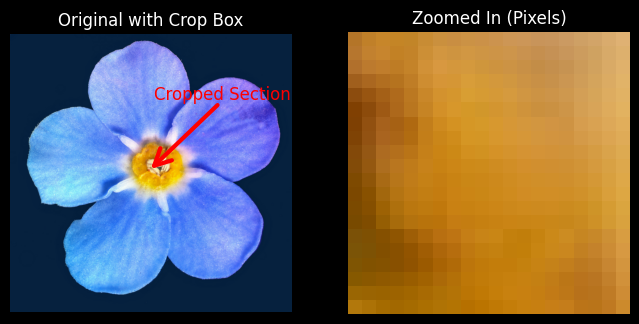
By examining pixels as numbers, we can start to understand how computers interpret images mathematically.
Images as Numbers
To a computer, every pixel is a number. In a grayscale image, each pixel value corresponds to its brightness.
For instance, a pixel with the value 0 is completely black, 255 is white, and 128 is medium gray.
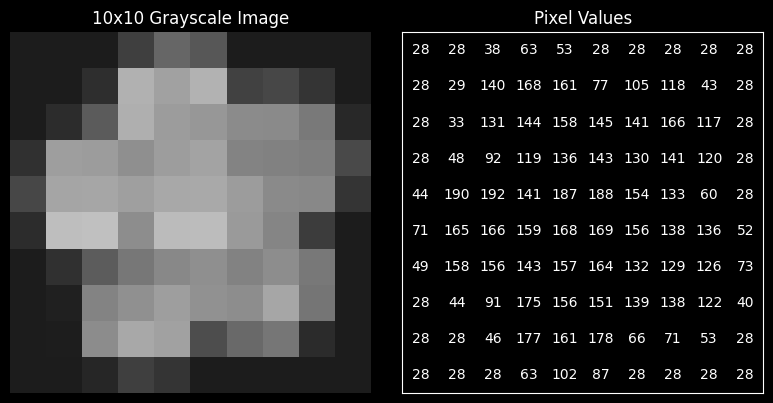
Visualizing images as numbers is a crucial first step for any computer vision task, from detecting edges to recognizing objects.
Color Images and RGB Channels
Most images you see are in color. Color images are usually represented using the RGB model—each pixel has three numbers corresponding to Red, Green, and Blue intensities.
By combining these three numbers, we can reproduce millions of colors.
For example:
(255, 0, 0)produces pure red(0, 255, 0)produces pure green(0, 0, 255)produces pure blue(255, 255, 0)produces yellow
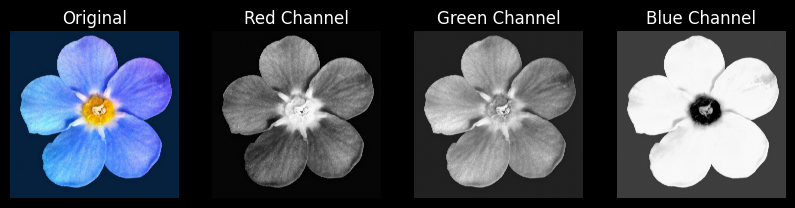
Breaking down an image into its color channels is a foundational technique in computer vision, helping algorithms identify objects and features based on color.
Why Understanding Pixels Matters
Understanding that an image is just numbers arranged in a grid is not just academic—it’s practical. All computer vision algorithms, from simple filters to complex deep learning models, rely on these numeric representations.
Grayscale representations help algorithms focus on intensity patterns without worrying about color.
Color channels enable color-based analysis, segmentation, and object recognition.
Pixel-level visualization allows beginners to see exactly what a computer “sees,” making it easier to understand operations like blurring, sharpening, and thresholding.
Code Example
For a deeper understanding of these concepts, I highly recommend exploring the code in this GitHub repository. It contains all the examples and visualizations from this guide, ready to run and experiment with.
Next Steps
With a solid grasp of pixels, grayscale, and RGB channels, you are ready to explore the first computer vision operations:
Image filtering (blurring and edge detection)
Thresholding (turning an image into black-and-white regions)
Contour and shape detection
These concepts build directly on what you’ve learned about how images are represented as numbers, and they form the foundation for more advanced topics like convolutional neural networks and object detection.
Read More
Read more articles on the topics that interest you

Will AI Replace Accountants in South Africa? 2026 Answer
Which accounting tasks are changing, which jobs remain, and what to learn next

7 Best Free AI Tools for Small Business Owners in SA
Use these for writing, design and research, with clear limits on free plans

How Much Do Data Analysts Earn in South Africa in 2026
Compare junior, mid-level and senior pay, plus the skills that can lift offers

How to Use ChatGPT to Find a Job in South Africa: 6 Steps
Use AI to sharpen your CV, target local vacancies and prepare for interviews

Become a Software Developer in South Africa: 6 Steps
Choose a learning route, build proof of skill and plan for your first role

Solar Cost for Small Businesses in South Africa: Ranges
See what different system sizes include, where extra costs hide, and how to compare quotes