

Access real-time, historical, and end-of-day financial data. Developer-first APIs, SDKs, MCP server and more.
Get startedBasic Computer Vision Operations
Blurring, Edge Detection, Thresholding, and Contours
Once you understand how images are represented as pixels, grayscale, and RGB channels (see Foundations of Computer Vision), the next step is to explore how computers can process and manipulate images.
This section introduces fundamental computer vision operations that are building blocks for more advanced tasks.
Image Filtering: Blurring and Edge Detection
Blurring is one of the simplest image processing techniques. It smooths an image by averaging nearby pixel values, reducing noise and small variations. This is often used before more advanced operations like edge detection to avoid false edges caused by minor noise.
Edge detection, on the other hand, highlights boundaries between objects in an image. It identifies areas where pixel intensity changes sharply.
One popular method is the Canny edge detector, which produces a clear outline of the shapes in an image.
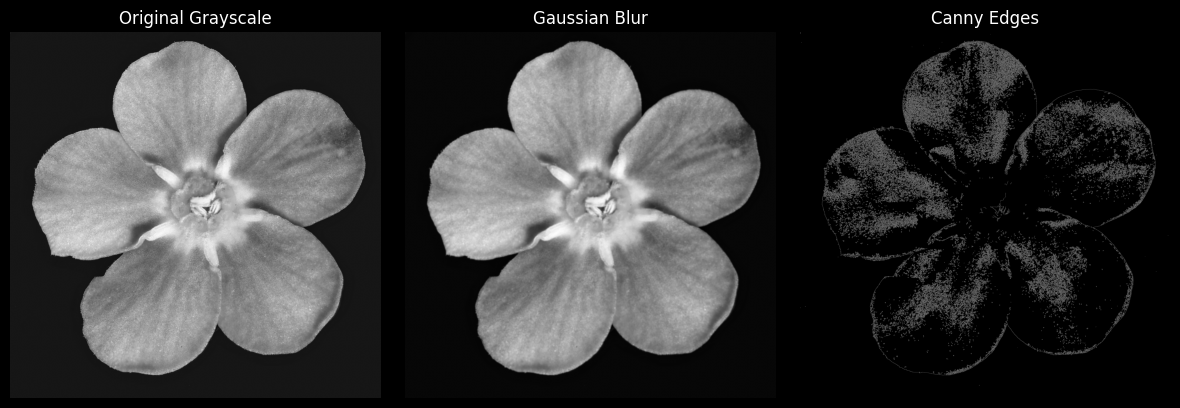
Blurring and edge detection are foundational tools because they allow computers to focus on important structures while ignoring small, irrelevant details.
Thresholding: Converting to Black-and-White
Thresholding is a technique that turns a grayscale image into a binary black-and-white image. Pixels brighter than a set threshold become white, and all other pixels become black.
This simplification is extremely useful for highlighting key objects in an image and preparing it for further analysis.
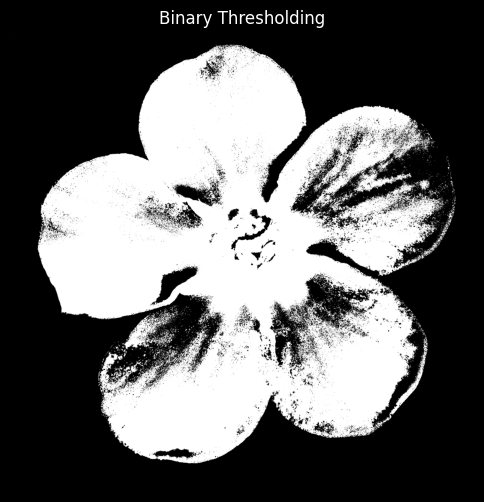
Thresholding helps algorithms understand the structure of an image without dealing with complex colors or subtle variations in brightness.
Contour and Shape Detection
Contours are simply the outlines of objects in an image. Once an image is thresholded, contours can be detected and drawn over the original image.
This technique is widely used for object recognition, shape analysis, and feature extraction.
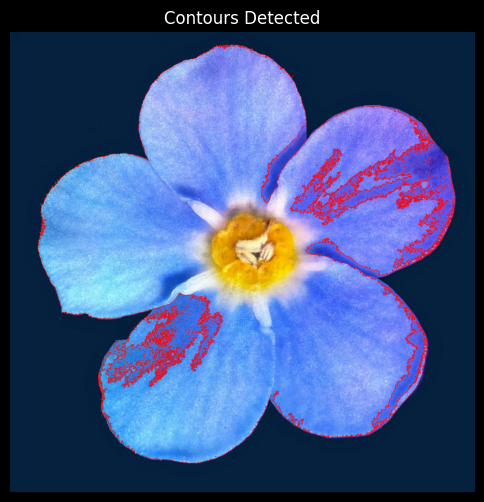
By visualizing contours, beginners can see how computers interpret shapes and boundaries, which is essential for understanding more advanced computer vision tasks like object detection.
Why These Operations Matter
These basic operations build directly on the concept of images as numbers:
Blurring operates on pixel values to smooth variations.
Edge detection highlights significant intensity changes between pixels.
Thresholding converts numeric pixel intensities into simple black-and-white regions.
Contour detection interprets these regions to identify object boundaries.
Together, these techniques form a foundation for almost every computer vision application, from simple image editing to complex AI-driven object recognition systems.
Code Example
For a deeper understanding of these concepts, I highly recommend exploring the code in this GitHub repository. It contains all the examples and visualizations from this guide, ready to run and experiment with.
Next Steps
After mastering these operations, you can explore more advanced topics:
Segmentation to isolate regions of interest
Deep learning models for image classification
Understanding pixels, grayscale, color channels, and these basic operations provides a strong foundation for diving into the exciting world of computer vision.
Read More
Read more articles on the topics that interest you

Solar Cost for Small Businesses in South Africa: Ranges
See what different system sizes include, where extra costs hide, and how to compare quotes

How to Buy Bitcoin in South Africa Legally in 5 Steps
Choose a provider, pay in rand, check the costs and keep tax records

How to Build a Full-Stack Web App With AI in 7 Steps
Adapt a starter project, then use AI to build, test and launch your first working version

Best AI Website Builders for Beginners in 2026: 5 Picks
Compare easy site creation, online selling, costs and the trade-offs before you choose
Jobs most likely to be replaced by Artificial Intelligence
Exploring careers at risk due to AI advancements and automation

How to start an AI business in South Africa
Essential steps for launching an AI venture in South Africa